Saturday, February 23, 2013

Which Correlation to use?

Summarized in the screen shot below: Which correlation to use when you have different types of data. This in no sense is complete, because you first need to understand the behaviour (or at least have a sense of it) of data before applying the statistical tools such as this.


Wednesday, February 13, 2013

Syntax vs Semantics


Semantics ~ Meaning
Syntax ~ Symbolic representation
So two programs written in different languages could do the same thing (semantics) but the symbols used to write the program would be different (syntax).
A compiler will check your syntax for you (compile-time errors), and derive the semantics from the language rules (mapping the syntax to machine instructions say), but won't find all the semantic errors (run-time errors, e.g. calculating the wrong result because the code says add 1 instead of add 2).

Actually there are not two levels but three:
  • lexical level: how characters are combined to produce language elements ( i and f produces if)
  • syntactical level: how language elements are combined to produce language expressions ( if(42,==answer and ) produces a conditional statement)
  • semantic level: how language expressions are converted to CPU instructions in order to form a meaning (a conditional statement allows to execute one branch or the other depending on the result of the boolean expression)

Syntax refers to formal rules governing the construction of valid statements in a language. 
Semantics refers to the set of rules which give the meaning of a statement.

Sources: http://programmers.stackexchange.com/questions/113800/whats-the-difference-between-syntax-and-semantics


What Does Parsing Mean?

This may not be complete explanation but i find it helpful to understand:


Parsing is the process of analyzing text made of a sequence of tokens to determine its grammatical structure with respect to a given (more or less) formal grammar.
The parser then builds a data structure based on the tokens. This data structure can then be used by a compiler, interpreter or translator to create an executable program or library.
alt text
If I gave you an english sentence, and asked you to break down the sentence into its parts of speech (nouns, verbs, etc.), you would be parsing the sentence.
That's the simplest explanation of parsing I can think of.
That said, parsing is a non-trivial computational problem. You have to start with simple examples, and work your way up to the more complex.

Source: http://stackoverflow.com/questions/2933192/whats-the-best-way-to-explain-parsing-to-a-new-programmer

Saturday, January 19, 2013

Configuring Pidgin for Gtalk on Ubuntu

Default settings may not work for you like they did not for me. Here is what worked for me:
Once you have setup your account change the following settings on
accounts->abc@gmail.com->edit account
Basic->Protocol set to XMPP
Advanced->Connect port to 443
Advanced->Talk Port to talk.google.com
Advanced->Connection Security to old-style SSL

You might also want to go to
Tools->Plugins->Libnotify Popups ->Configure Plugin-> Uncheck Buddy signs on, to disable annoying notifications every time somebuddy comes online.

Friday, January 18, 2013

Solved: Ubuntu Touchpad Problem on Vaio VGN-CS24GH

This is a little off from the topics of this blog but this bug troubled me so much that I had to put the solution that worked, out. Here is what I did:

Run the following commands on terminal:

sudo modprobe -r psmouse 
sudo modprobe psmouse proto=imps
sudo gedit /etc/modprobe.d/touchpad.conf

Write the following line in file touchpad.conf:
options psmouse proto=imps

Close the file. That's it!
As of now this is working perfectly on my laptop, Sony Vaio VGN-CS24GH, I hope it works for you too!

Compiling C, C++ Programs on Ubuntu

If you are a developer you need C and C++ Compiler for your development work.In ubuntu you can install the build-essential for C and C++ compilers.

Install C and C++ Compilers in Ubuntu

sudo aptitude install build-essential

This will install all the required packages for C and C++ compilers

Testing C and C++ Programs

Compiling Your first C Programs

Now you need to open first.c file

sudo gedit first.c

add the following lines save and exit the file


Firstly compile the code using the following command

cc -c first.c

that would produce an object file you may need to add to the library.

then create an executable using the following command

cc -o first first.c

Now run this executable using the following command

./first

Output should show as follows

Hello, world


Compiling your first C++ program

If you want to run c++ program follow this procedure

g++ is the compiler that you must use.

you should use a .cpp file extension rather than a .c one

You need to create a file

sudo gedit first.cpp

add the following lines save and exit the file


Run your C++ Program using the following command

g++ first.cpp -o test

./test

Output should show as follows

Hello World!


OR 


1. Install the 'build-essential' package.
$ sudo apt-get install build-essential

2. Write your first C program.
gedit myhello.c
paste this code into it, and save

#include <stdio.h>

main()
{
printf("Hello Ubuntu Lover!\n");
}


3. Compile your first C program

$ gcc myhello.c -o myhello


4. Run your first C program

$ ./myhello
Hello Ubuntu Lover!


5. Write your first C++ program
gedit myhello.cpp
paste this code into it, and save
#include <iostream>
using namespace std;

int main()
{
cout << "Hello Ubuntu Lover in C++" << endl;
return 0;
}

6. Compile your first C++ program
g++ myhello.cpp -o myhellocpp

7. Run your first C++ program
$ ./myhellocpp
Hello Ubuntu Lover in C++


Source of information:
 
  1. How to write and run c/c++ programs on ubuntu
  2. How to Install C and C++ Compilers in Ubuntu and testing your first C and C++ Program

Monday, November 5, 2012

Quality Policy: Definition & Examples

Juran defines Quality Policy as "Overall intentions and direction of an organization with regard to quality, as formally expressed by top management." 

Words to notice in this definition are intention and direction.
Below are few examples of Quality Policies:

Kinetic India:

" We shall strive to deliver products to meet and exceed Customer expectations of Quality, Delivery and cost "

This policy shall be deployed through
Continual improvement in product quality by process control & variability reduction.
Up gradation of manufacturing technology and skills
Cost reduction through elimination of waste in all Business processes.
Development of Human Resources
Development and participation of our suppliers

Tata Motors

Tata Motors is committed to maximizing customer satisfaction and strives to achieve the goal of excellence through ongoing development; manufacture and sale of reliable, safe, cost effective, quality products and services of international standards, by using environmentally sustainable technologies for improving levels of efficiency and productivity within its plants and ancillaries.

Tata Motors also has a commitment towards improving the quality of life of its employees, both within and outside its plants and offices, through improved work practices and social welfare schemes.

Toshiba Electron Tubes and Devices

1. We shall conduct quality-related activities in order to provide customers with the best possible products.
2. We shall observe all relevant laws, regulations, and contracts, and make efforts to continuously improve quality. By ensuring the quality and safety of our products, we will meet our customers' requirements and increase customer satisfaction.
3. We shall establish a quality management system and work to continuously improve the system.
4. We shall do our best to provide products of consistent quality. We shall investigate and identify the root cause of any inconsistencies based on data,and make all required improvements in order to ensure consistent quality.

Dabur Research Foundation

We are committed to quality compliances in all our deliverables.
-Consistent and Continuous Quality Management.
-The Management is fully committed to Quality and ensures all resources to accomplish this task.
-We value our 4C's- Compliance, Credibility, Consistency and Confidentiality.
-At DRF, Quality is a relentless commitment to continuous improvements in processes and systems, to provide consistent quality services to meet our customer requirements.

L&T Electricals Saudi Arabia Co. Ltd

It is our policy to:
-Deliver Electrical products and services meeting or exceeding customer requirement and expectation while improving value to stakeholder.
-Comply with statutory and regulatory requirements related to product, services, health & safety.
-Achieve operational efficiency by attaining productivity and profitability.
-Encourage development and involvement of employee at all level.
-LTESA management is fully committed to implement Quality Management System and continually improve its effectiveness in the organization.


Friday, October 12, 2012

References In Excel

In formulas references to cells or locations are excel are used. 

What kind of references are there in excel?

Referencing in the same sheet:

Relative: Ex. A1, B1 in the formula =A1*B1 written in the cell C1 is a relative reference. If you will copy paste this formula from cell C1 to C2 the formula will be pasted as =A2*B2 i.e. relative to the positioning of C2, excel is smart enough to find the relative quantities that have to be multiplied. 

Absolute: Ex. $A$1, $B$1 etc is absolute positioning. Why would you absolute positioning? One of the many possible cases is when the formula uses some constant say pi(=22/7). If you have put the value of constant at position say, A1 then you can refer to this constant in all the formulas by $A$1. When you copy paste formula from a cell in this case the $A$1 reference remains unchanged.

Row Absolute: Ex. A$1, B$1 etc i.e. only column will change, row is fixed as 1.

Column Absolute: Ex. $A1, $B1 etc i.e. only row will change, column is fixed as 1.

Referencing to a cell in other worksheet:
The general way is by using 'sheetname'!cell.
Ex: 'Sheet1'!A2

Referencing to cell in other workbook:
'[workbookname.xls]sheetname'!cell
Ex: '[Expenditure.xls]Household'!B3

If the workbook we are referencing to is closed then we have to give its path too as:
'D:\ExcelPractice\[workbookname.xls]sheetname'!cell

Thats it about referencing for now.


PS: Corrections/Suggestions/Comments are welcome!

Excel: Random Stuff Part 1

To write same thing on multiple cells
1. Select a range of cells say from A1 to A10 
2. Write whatever you want to write
3. Press Ctrl+Enter

If what you want to write is already there in a cell and you want to copy it in cells adjacent to it 
1. Select the cells where you want the text
2. Select the cell which has the required text
3. Press F2
4. Press Ctrl+Enter

To copy a cell contents on the cell to the right, 
1. Select the range of cells 
2. Press Ctrl+R

To copy a cell contents on the adjacent cells below, 
1. Select the range of cells 
2. Press Ctrl+D

To write a fraction 
1. Write 0 followed by a space and the fraction with the slash
2. Press Enter

Use TAB or Enter to move in a selected range of cells

To edit contents of cell Press F2 and it takes you in the cell

To convert a formula into its numerical value 
1. Go in the cell 
2. Press F2
3. Select the formula or part of the formula which you want converted
4. Press F9
5. Press Enter
This method loses the formula while retaining the calculated value.

To compare values in two cells
1. Use expression like =A1=B1, =A1>B1, =A1<B1
2. It returns either True or False

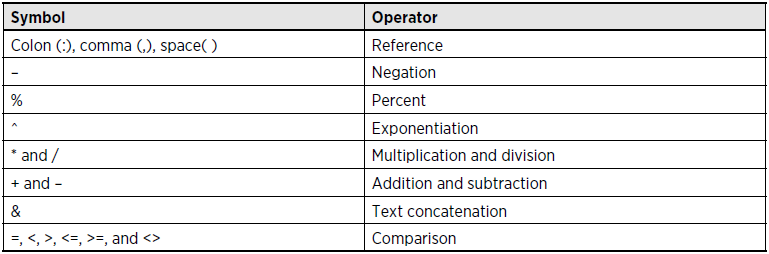
Table of Operators in Excel


And and Or in Excel
=OR(A1=100, A1=200) returns TRUE if either of A1=100 or A1=200 holds else FALSE

=AND(A1<100, A2>200) returns TRUE if both A1<100 and A2>200 holds else FALSE


Operator Precedence in Excel


Calculating Formulas
If calculation mode (Formulas>Calculation>Calculation Options) is set manual then:
Press F9 to recalculate the sheet

scanf() Infinite Loop

Every call to scanf picks up from where the last one stopped matching the input.  This means that if an error occurred with the previous scanf, the input it failed to match is still left unread, as if the user typed ahead.  If care isn't taken to discard error input, and a loop is used to read the input, your program can get caught in an infinite loop.

(Source: http://wpollock.com/CPlus/PrintfRef.htm)

You can also use flushall(); within the loop and before calling the scanf to tackle this problem.


Thursday, September 13, 2012

Capitalize First Letter Of Sentences

Compiler Used: TurboC
Language: C

This program demonstrates how to read file contents from c.txt, capitalize first letter of every sentence and then write it to d.txt.


//capitalize first letter of every sentence
//after every fullstop capitalize the first alphabet encountered
#include<stdio.h>
#include<conio.h>

void main(){
clrscr();
int cap=1;
char c;
FILE *fp1, *fp2;

fp1 = fopen("c.txt", "r");
fp2 = fopen("d.txt", "w");
while((c=getc(fp1))!=EOF){
if(c == '.'){
cap =1;
}
if(cap ==1 && c >=97 && c<=122){
c = c-32;
cap =0;
}
putc(c, fp2);
}
rewind(fp1);
while((c=getc(fp1))!=EOF){
 putchar(c);
}
printf("\n\n");
fclose(fp1);
fclose(fp2);
fp2 = fopen("d.txt", "r");
while((c=getc(fp2))!=EOF){
    putchar(c);
}
getch();
}

Here is what output looks like:

You can see contents of c.txt has been copied to d.txt and first letter of every sentence has been capitalized.

PS: Improvements/Suggestions/Comments on the program are welcome. I am sure there are better ways to do it.

Convert File Contents To Uppercase In C

Compiler Used: TurboC
Language: C

This program copies content from a.txt converts it into uppercase and writes it to file b.txt.


#include<stdio.h>
#include<conio.h>

void main(){
clrscr();
char c;
FILE *fp1, *fp2;
fp1 = fopen("a.txt", "r");
fp2 = fopen("b.txt", "w");
while((c = getc(fp1))!=EOF){
//printf("%c", c);
//getch();
if(c>=97){
 c = c-32;
}
putc(c, fp2);
}
fclose(fp1);
fclose(fp2);
fp2 = fopen("b.txt", "r");
while((c=getc(fp2))!=EOF){
 putchar(c);
}
fclose(fp2);
getch();
}

PS: Comments/Suggestions/Improvements are welcome.

Copying From One File To Another In C

Compiler Used: TurboC
Language: C

This is a simple program to demonstrate file handling in C by copying contents of a.txt to b.txt and displaying on the screen.


#include<stdio.h>
#include<conio.h>

void main(){
clrscr();
char c;
FILE *fp1, *fp2;

fp1 = fopen("a.txt", "r");
fp2 = fopen("b.txt", "w");
while((c = getc(fp1))!=EOF){
        putc(c, fp2);
}
fclose(fp1);
fclose(fp2);
fp2 = fopen("b.txt", "r");
while((c=getc(fp2))!=EOF){
        putchar(c);
}
fclose(fp2);
getch();
}

PS: The program can be made better in a lot of ways. Suggestions/Comments are welcome.

Sunday, September 9, 2012

Understanding The Switch Statement

Basic Syntax:

switch(some-expression){
case some-constant1:
/* some code*/
break;


case some-constant2:
/* some code*/
break;


default:
/*some code*/
break;
}

Now important points worth noting are:

  1. some-expression in the switch(some-expression) can be an expression, a constant or a variable
  2. In the cases within switch construct, some-constant are constant integer values. Floats and expressions are not allowed here
  3. break; is optional
  4. default case is also optional
Interesting cases arise when break; are not used. Look at the following example:


switch(1*3-1){
case 1:
printf("\nThis is case 1.");


case 2:
printf("\nThis is case 2.");


case 3:
printf("\nThis is case 3.");

default:
printf("\nThis is default case.");
}

If you run this the output is:

This is case 2.
This is case 3.
This is default case.

So you can see that switch goes directly to the case indicated by the value of some-expression and then keeps on executing statements until a break; is encountered or until the end of the construct.

PS 1: Compiler used is TurboC
PS 2: Corrections/Suggestions/Comments are welcome.

Wrong Input Through scanf, What Happens?

scanf does not assign the value entered in case of wrong input.

Go through the following lines of code:

#include<stdio.h>
#include<conio.h>

void main(){
int x=100;
scanf("%d", &x);
printf("Value of x is = %d", x);
getch();
}

Now the scanf is supposed to scan an integer value. Take 2 cases where you input:
(i) 2
(ii) d (or any character)

In (i) printf prints Value of x is = 2.
In (ii) printf prints Value of x is = 100.

Note that when you give wrong input to scanf, it does not assign any value to x and so the previous value of x is retained.

PS1: Compiler used TurboC.
PS2: Corrections/Suggestions/Comments are welcome!

What Does printf & scanf return?

printf returns the number of characters it prints. 

Examples:
If you write an expression like:
x = printf("%s", "Muttley is awesome!"); or
y = printf("%d", 1111);
then, what does printf return to x and y?

x = 19 and y = 4.

scanf returns the number of items it scans. However it stops scanning as soon as you give wrong input.

Examples:
p = scanf("%d%d%d", &y, &z, &w);
r = scanf("%d%d", &y, &z);

If all inputs are correct in the expression for p then, 
p = 3. Similarly, r = 2.

Lets say you give wrong third input(may be you enter a character instead of int) in the expression for p, immediately scanf stops and returns the value 2 to p. If the first input is wrong then scanf will return 0 to p.

So we can say that scanf returns the number of items scanned before the first wrong input entered. 
(Reminds me of geometric distribution)

Thursday, September 6, 2012

Small q And BIG Q


Little Q is performance to specifications, i.e. the approach that is dominant in Six Sigma and ISO 9000.

Big Q is delivering what the customer wants and exceeding those expectations. It’s the difference between tactical quality management and strategic quality management.


Big Q arose out of the realization that managing for quality should not be limited to manufacturing companies and manufacturing processes, but should also include service companies and business processes. Quality managers and upper managers have most accepted the concept of Big Q, starting in the 1980s, and the trend has been growing ever since. Time has also shown that managers in technological areas and certain staff functions have traditionally been the most resistant to it.

Big Q takes the goals of more traditional, earlier modes of quality control management (“Little q”) and builds on them. For the purposes of better understanding, let’s look at it this way: In terms of products, for example, the content of Little q would be manufactured goods, while the content of Big Q would encompass all products, goods and services, whether for sale or not. In terms of processes, Little q focuses on those processes directly related to the manufacture of goods, while Big Q covers all processes.

It has been demonstrated that since the widespread adoption of the Big Q concept in the 1980s, recognition for quality within the corporate world has increased. Quality councils have sprung up more and more to nominate and select specific projects to be recognized for their quality achievements. The scope of these nominations has increased over time, and this has been attributed to the manner in which Big Q has broadened the notions of what constitutes quality management.

Big Q has become an integral component in the business world, and is without question here to stay. We just may not call it Big Q. Some may call it TQM, some Six Sigma and others just common sense.

PS: Source- juran.com

Who Is Customer & Types Of Customers


A customer is anyone who is impacted by the product or process. Customers may be external or internal.

EXTERNAL CUSTOMERS. These are impacted by the product but are not members of the company that produces the product. External customers include clients who buy the product, government regulatory bodies, and the public (which may be impacted due to unsafe products or damage to the environment).

INTERNAL CUSTOMERS. They are impacted by the product, and are also members of the company that produces the product. They are often called "customers" despite the fact that they are not customers in the dictionary sense, that is, they are not clients.

Saturday, September 1, 2012

Measures of Central Tendency

What does it measure of central tendency mean?

Measure of central tendency is a single value that attempts to describe a set of data by identifying the central value of that set of data.

Mean

When NOT to use mean?

Mean is susceptible to outliers. Which means it is effected by extremely high and extremely low values in the data. In such situations median is preferred over mean.

Another case is when the distribution is skewed. As the data becomes skewed the mean loses its ability to provide the best central location for the data as the skewed data is dragging it away from the typical value in the direction of the skew. In this case also median is preferred measure of central tendency.

Median

Median is a value that splits the data in two equal halves.
To calculate median arrange the data in ascending order then:
1. If the number of data (n) is odd then median is (n+1)/2th value.
2. If the number of data (n) is even, median is the average of n/2 and (n/2 + 1)th value.

Median is more resistant to outliers and skewed data than mean.
If data is non-normal then it is customary to use median instead of mean.

Mode
Mode is the most frequently occurring value in the data. Normally mode is used for categorical data.

The problem with mode is that it is not unique. In case of multi-modal data which mode represents the central tendency of data set becomes a difficult question.

Mode is also not suitable measure of central tendency in case of a continuous data, especially if the data set is not large. In such cases getting a clear mode becomes a problem.

Another case may arise when the most frequent data is far away from the rest of the data. In such case mode does not give a good measure of central tendency.

Summary of when to use mean, median , mode

Type of VariableBest measure of central tendency
NominalMode
OrdinalMedian
Interval/Ratio (not skewed)Mean
Interval/Ratio (skewed)Median


PS1: Source: Laerd Statistics: Mean, Mode, Median - Measures of Central Tendency
PS2: Corrections/Improvements/Comments are welcome.